Paste a Mermaid flowchart and download a .docx where every node is a native, editable Word shape and every arrow a connected, rerouting connector — not a screenshot. The same diagram also downloads as PDF or SVG. Everything runs in your browser: your diagram text never leaves your device, and the .docx opens in Word, LibreOffice and WPS.
Most "Mermaid to Word" tools embed your diagram as a 2× image. That is why their own FAQ reads "why is the image an image?". Here the diagram is not one.
Free, no sign-up
No watermark
Paste a flowchart block — from ChatGPT, Claude, a README or your notes. Everything is parsed in your browser; nothing is uploaded.
LIVE PREVIEWPreview loading…
or export asLink copied.docx — native shapes you can still edit, opens in Word / LibreOffice / WPS · PDF — fixed page, exactly as previewed · SVG — one vector file, fonts embedded
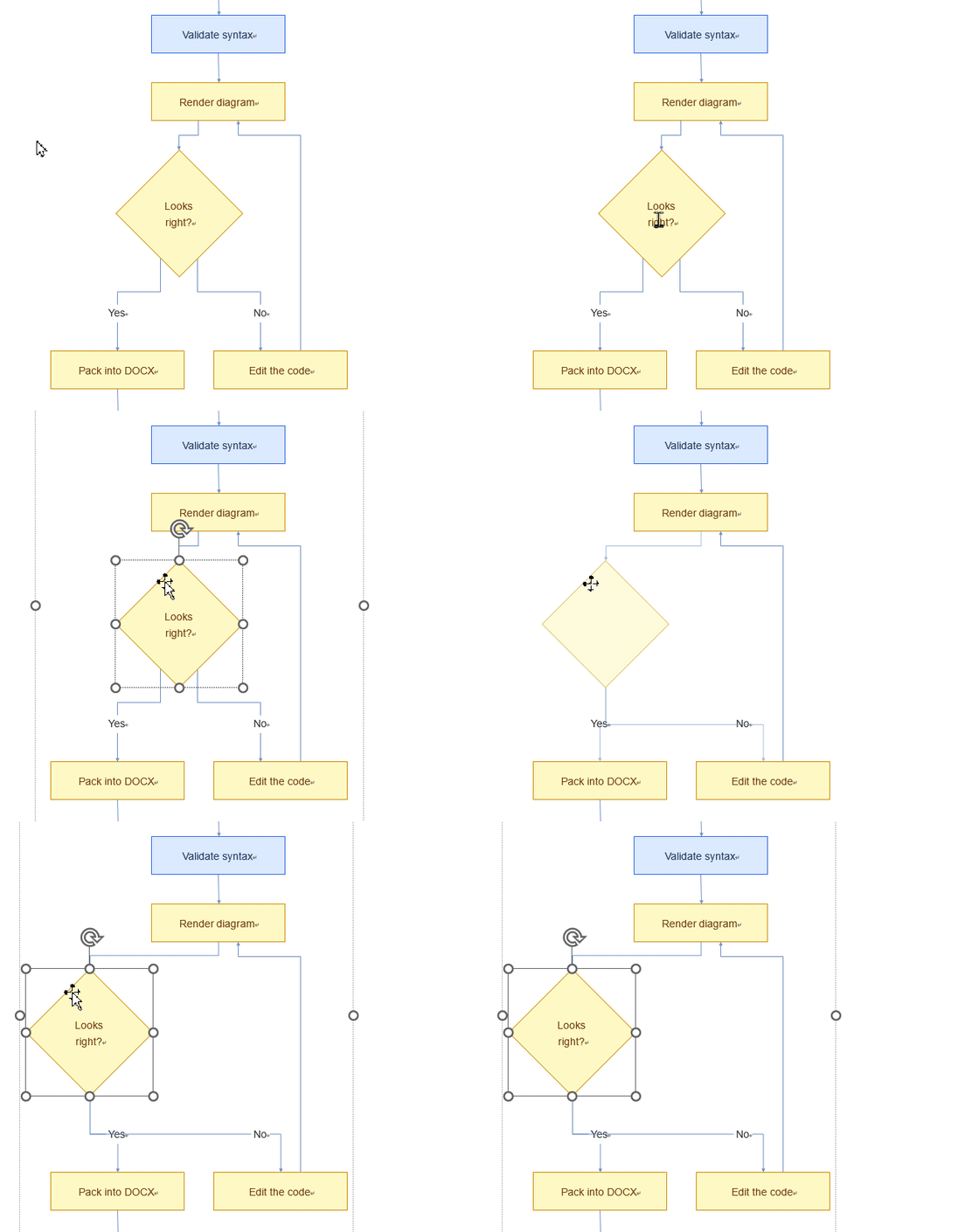
In Word: click a node to select it, double-click the text to retype it, and restyle it with Word's own shape tools — connectors stay bound and reroute when you move things.
A diagram you can keep editing
Every "mermaid to Word" converter you have used probably ends the same way: with a picture pasted into the page. It looks right until someone asks you to change one label, recolour one box, or move one step — and then you go back to the source, re-render, and paste again.
To put a number on it: the seven-node flowchart in the example above becomes 16 editable shapes in the .docx — 7 node shapes, 7 connectors bound to those nodes at both ends, and 2 label boxes. Nothing in the file is an image. Open it in Word, click any box, and Word selects a shape, not a picture frame.
This tool takes the other road. It converts your Mermaid flowchart into the drawing format Word itself uses: each node becomes a shape you can select and restyle, each connector a line that is bound to the two shapes it joins. Edit a label by typing, drag a box and watch the arrows follow — the diagram becomes a Word document in the fullest sense, not an image sitting in one. When a fixed picture is what you actually need, the same diagram also leaves as PDF or SVG in one click.
Exported .docx opened in Word — drag a shape and its connectors follow.
Preview and export come from one engine
The live preview on this page and the .docx you download are produced by the same layout and connector-routing code, so there is no "it looked different in the preview" surprise. Node sizes, connector shapes and label wrapping are decided once and written to both outputs.
Connector routing is the part that usually gives this away in other tools. Here, each edge is measured and assigned a connector form — straight, bent or S-curve — with attachment points chosen on the source and target shapes, and both the preview and the Word file write exactly that geometry. In Word the connectors stay bound: move a shape and Word reroutes the line, because Word knows it is a real connector.
One diagram, three downloads — Word is the point
The .docx is the reason this tool exists, and it is the one to choose unless you have a specific reason not to. The PDF and SVG downloads exist for the cases where the Word file is the wrong container, not as equal alternatives: they carry the same rendered picture, but none of the editing.
Download
What you get
Choose it when
.docx — the editable one
Every node a native Word shape, every arrow a bound connector. Still a diagram after you open it.
You (or a colleague) may need to change a label, move a step or restyle a box later — which is most of the time.
PDF
A fixed page, rendered exactly as previewed.
The diagram is finished and needs to print, be reviewed, or ride along with a report as-is.
SVG
One self-contained vector file with fonts embedded.
It goes onto a wiki, a slide deck or into another design tool that takes vectors.
For comparison: what ends up in the .docx when other tools do it
What ends up in the .docx
Drag a box
Retype a label
Restyle a box
Print at any size
Needs installing
Raster image
No
No
No
No — it softens
Nothing
Vector art (SVG/EMF)
No
No — outlines only
No
Yes
Nothing
Native shapes (this one)
Yes — the arrows follow
Yes — double-click and type
Yes — Word's own shape tools
Yes
Nothing
Private by construction, not by promise
There is nothing to upload because there is no server doing the work. The parser, the layout engine and the .docx writer all run in your browser tab; the download is assembled right there in the tab as well. Your diagram text — which may describe internal architecture or process details you would rather not paste into a web form — never leaves the device.
That also makes the tool fast in the way installed software is fast: no queue, no rate limit, no file-size cap, and no waiting on somebody else's server. Paste, adjust, download, repeat.
Frequently asked questions
Is the Word diagram editable, or is it just an image?
Every node is a native Word shape and every connector is a native drawing connector, bound to the shapes it links. You can restyle them with Word's own tools, edit the labels, and drag a node — its connectors reroute and stay attached, exactly like a diagram you drew in Word itself.
Does my diagram get uploaded anywhere?
No. Parsing, layout and .docx generation all happen in your browser tab. The Mermaid text you paste never leaves your device, and once the page has loaded nothing further is sent anywhere.
Which Mermaid diagram types are supported?
Flowcharts (flowchart / graph, TD/LR and the other directions) with the common node shapes — rectangles, rounded boxes, diamonds, circles, stadiums, cylinders, subroutines and more — including edge labels, dotted links and classDef styling. Sequence, ER and gantt diagrams are not supported yet.
Does it also export PDF or SVG?
Yes — both buttons sit next to the .docx download. PDF gives you a fixed page exactly as previewed, which is what you want for printing or a review copy. SVG gives you one self-contained vector file with the fonts embedded, for a wiki, a slide deck or another tool. Neither is editable the way the .docx is: they are the picture, not the diagram.
Why is only the Word file editable?
Because Word's drawing format is the only one of the three that stores structure: each node is a shape with its own text and fill, each connector a line bound to the shapes it joins. Page formats such as PDF and SVG store the drawing, not the relationships, so a node there is a path, not a box you can drag. That is why the .docx is the default and the other two are exports of the same picture.
Which versions of Word can open the result?
The export targets the modern .docx drawing format, so it opens in Word 2010 and later, Microsoft 365, LibreOffice Draw/Writer and WPS Office. In every one of them the shapes stay editable and the connectors stay bound.
Why does the preview look like a Word document?
Because it is the same geometry the .docx will contain: the preview and the export are rendered from one shared layout-and-routing engine, so what you see before downloading is what opens in Word — same node sizes, same connector shapes, same label wrapping.
Why doesn't pasting an SVG into Word make it editable?
Word 2016+ can convert an inserted SVG into shapes (right-click → Convert to Shape), but the connectors usually don't survive — each arrow becomes a separate line that does not follow the box it points at. You get something that looks editable until you try to drag a node.
If I save the .docx as PDF inside Word, is it still editable?
No. Word flattens the shapes into fixed page artwork at that moment. That's fine if the PDF is the final deliverable — just make sure it's the last step, not the middle one.
Can I get this diagram into PowerPoint?
Not directly — this tool exports .docx, .pdf and .svg. For PowerPoint, download the SVG and drop it onto a slide, then right-click → Convert to Shape (PowerPoint 2016+). The result is an editable shape, though connectors usually don't survive — the same reason pasting an SVG into Word doesn't give you a diagram you can drag.
Also searched as "mermaid to docx"
Same file, different spelling. A .docx is a Word document — there is no separate conversion path. If you searched for "mermaid to docx online" or "md mermaid to docx", the box above produces exactly that file.
Not sure which output format you need? See Mermaid diagrams in Word — it explains why the format matters and when to pick .docx, PDF or SVG.
This site sets no advertising or tracking cookies. Your files are processed in your browser and never uploaded — the only thing stored is this choice, on your own device. Privacy policy